HOW TO INSTALL a SIM file on an eSIM phone.
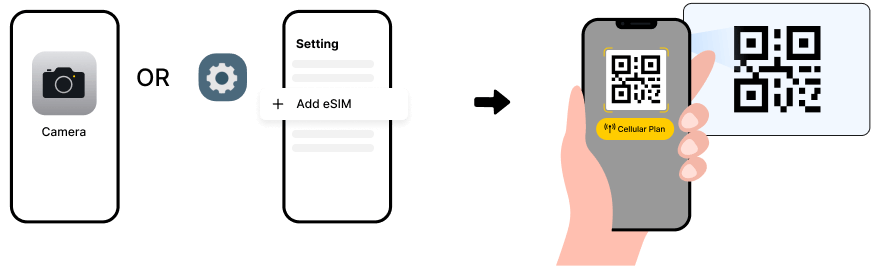
method1: scan QR code
1. Scan the QR Code using your phone's camera.
2. Click "Cellular Plan" to install.
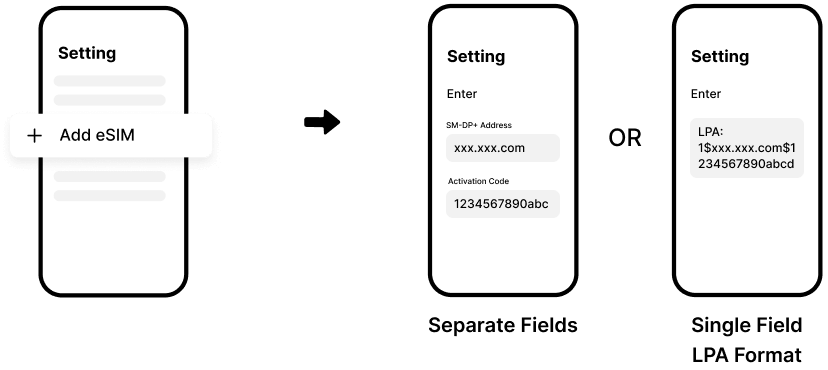
method2: enter activation code manually (general instruction)
1. Go to Settings > Cellular > Add eSIM > Enter Details Manually.
2. Enter the “SM-DP+ Address” and “Activation Code”, then tap “Next”.
HOW TO CONNECT to the foreign networks
- Turn on the eSIM from device's system settings
- Activate the network profile that was installed with the downloaded SIM file
- Enable roaming to allow connections to networks in the foreign countries
APPLE iOS download & install a file for devices with an embedded-SIM (eSIM)
Official Instruction (2026): https://support.apple.com/en-us/118669
Official Instruction (2026): https://support.apple.com/en-us/118669
AOSP Android downloading & installing a network file for devices with an eSIM
NOTE 1
eSIM (a mini telecom access info memory-chip) has limited space and usually holds about 3 to 8 downloaded files before it becomes full. If your download/setup fails when WiFi internet is stable, then make sure you check to ensure that your eSIM is not full. Our eSIM can be re-downloaded only to the same eSIM, so make sure you are using the same eSIM of the same phone before downloading the file again if your phone has more than one eSIM (e.g. dual eSIM phones).
NOTE 2
Some older networks require a series of re-connections to read and register and apply and activate/confirm a newly established connection before the newly connected device can be recognized to grant the access. While many newer networks with more recent equipment can complete the process when the phone's airplane mode is turned on then turned off for about 1 to 3 times, some networks may require a full restart of a device for about 1 to 3 times before the device can be fully recognized. IF your data eSIM profile does not work upon arriving at the destination, THEN try to turn-on and turn-off the airplane mode 3 times at 30 seconds interval, THEN (if still doesn't work) restart the phone up to 3 times at 3 minutes interval.